piątek, 7 listopada 2014

vsan observer on windows "OpenSSL::X509::CertificateError: error getting time" error

As you probably know there is no better method to monitor your vsan environment than the vsan observer tool.

To start it on Windows-based vCenter Server you should navigate to vCenter installation folder:
C:\Program Files\VMware\Infrastructure\VirtualCenter Server\support\rvc

And run rvc.bat (Ruby vSphere Console) Note: Please edit the file before first use and change Administrator@localhost to user with administrative rights on vCenter server.

vSAN observer can be started with following command where vDC_name and cluster_name should match your infrastructure naming:
vsan.observer localhost/vDC_name/computers/cluster_name/ --run-webserver --force

Unfortunately, it is likely to fail, if you didn't generate SSL certificate, with error similar to:
2014-11-07 07:04:58 -0600: Spawning HTTPS server
2014-11-07 07:04:58 -0600: No cert passed in, no VCSA cert found, generating self-signed cert
[2014-11-07 07:04:58] INFO  WEBrick 1.3.1
[2014-11-07 07:04:58] INFO  ruby 1.9.3 (2013-02-22) [i386-mingw32]
............................................++++++
................................++++++
OpenSSL::X509::CertificateError: error getting time

To get rid of it simply add --no-https switch to the previous command:
vsan.observer localhost/vDC_name/computers/cluster_name/ --run-webserver --force --no-https

And enjoy your vsan observer started at http://vCenter_IP:8010/

czwartek, 29 listopada 2012

VMware VSA and Local Storage - RAID configuration

When deploying and configuring VMware Virtual Storage Appliance you have to make a decision about built-in RAID layout at the physical ESXi hosts which will be later part of the VSA cluster. VMware supports up to three hosts in the VSA cluster and it is very important to keep the same storage configuration on all of them.

All steps required to install VSA can be found in the official installation docs:
VSA Installation Guide

At the Page 27 you will find details about HP servers and two important recommendations:
  • Create a RAID logical volume that uses ALL physical disks on a server.
  • VMware recommends that you use RAID5 for SAS drives and RAID6 for SATA drives.
The funny thing is that the VMware still uses configuration steps for HP iLO v.2 which is outdated for at least 2 years. Worth mentioning that all HP Gen. 7 servers were shipped with iLO v.3 and HP Gen. 8 boxes with iLO v.4 where Local RAID Configuration process looks completely different.


wtorek, 20 listopada 2012

Difference between IPoIB and Native Infiniband

Great, short and "straight to the point" explanation of the main differences between Native Infiniband and IPoIB protocol:
For some detailed resources you should definitely check(you wouldn't be surprised that two of the top three Google results are here,would you...??):


BPDU Filter in vSphere 5.1 explained

Very good article about BPDU Filter was posted at the VMware vSphere Networking blog.
It explains configuration and some use case scenarios:
http://blogs.vmware.com/vsphere/2012/11/vsphere-5-1-vds-new-features-bpdu-filter.html

Have you ever faced Denial of Service caused by Spanning Tree Protocol(STP)...??
The KB posted in that article can help you to understand why it happens and how to avoid it:
http://kb.vmware.com/kb/2017193

poniedziałek, 1 października 2012

VMware vCenter SSO: MSSQL not supprted with Windows Authentication

I strongly recommend you to read VMware KB2034918 before installing vCenter SSO.
You definitely have to navigate to the "SSO database questions" section where you can read following sentence:

"Can I use Windows Authentication for the MSSQL database user name and password, as the JDBC Setup screen implies?

No. For MSSQL databases, you must use SQL Server Authentication database users. Windows Authentication users are not supported. For more information, see Connection to the MSSQL database fails during vCenter Single Sign On installation section of the VMware vSphere 5.1 Release Notes"


And now you can safely run installer, proceed to the Database Information and make sure you won't tick the most visible check-box out there...:)


Designed for future usage only...:P

środa, 12 września 2012

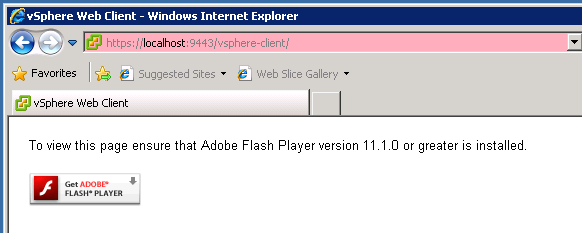
VMware vSphere Web Client - Welcome Window

What a nice, friendly looking and encouraging "welcome window" welcomed me after I've installed vSphere 5.1 today...:)


Perfectly stable, secure and bug free solution...:)

I am pretty sure as well that all of you have this port opened in your vSphere network...:)

poniedziałek, 3 września 2012

Minimum required permissions for Storage VMotion

Probably all of you, when looking for Storage vMotion permissions, will find KB:
http://kb.vmware.com/kb/1011345

This KB is at the first place in all searches issued from google...:)

All would be great, but it is actually no longer applicable to vCenter versions 4.x and 5.x and is related only to RCLI.

To create role which allows user to perform Storage vMotion you can copy standard Read-Only role (or VM User/VM Power User role -> depends on access to Virtual Machines you would like to give to users) and add following permissions:


Datastore -> Allocate Space
Datastore -> Browse Datastore
Datastore -> Remove File
Datastore -> Update Virtual Machine Files

Resources -> Migrate
Resources -> Relocate

Virtual Machine -> Provisioning
Virtual Machine -> Allow Disk Access
Virtual Machine -> Allow Read-Only Disk Access

Newly created role now allows you to perform Storage vMotion.

środa, 4 lipca 2012

Accept VMware vCenter Server Appliance EULA from command line

During the vCenter Server appliance deployment I accidentally skipped the license acceptance page. Unfortunately the page didn't appear ever again...:)

To deal with it I found a way to accept EULA directly from the appliances shell console:
  • Login to the vCenter server appliance shell console (default credentials: root/vmware)
  • Navigate to the /etc/vmware-vpx folder: cd /etc/vmware-vpx
  • Create empty file eula.accepted with: vi eula.accepted and save it: :wq
You can now start vCenter Service from the console with:
  • service vmware-vpxd start
  • service vmware-vpxd status

Hope it helps...:)

wtorek, 3 lipca 2012

Reclaim space from Thin Provisioned volumes

Today a tool to reclaim space from thin provisioned volumes was presented at the VMware Labs web page:

http://labs.vmware.com/flings/guest-reclaim

Unfortunately, before you will try it, you have to consider that there are still couple of "gotcha's":
  • Currently supports only RDM devices 
  • Doesn't work with NFS volumes 
  • Works only for NTFS filesystem

Here is a quotation from the official docs from point 6:

"The tool transparently operates on virtual disk if the hypervisor emulation layer reports virtual disks as thin provisioned. End to End reporting of thin provisioning status in a virtual storage stack is required to fully leverage Thin Provisioning in a virtualized environment.

This tool is not related to any VMWare ESX or any other Hypervisor Release. If ever ESX supports
unmaps on virtual disk in the future, it will be tied to “Virtual Hardware Version Upgrade” and will
mostly be in a release after vSphere 5.0.
For the authoritative word on ESX virtual disk unmap support, please check official updates about
features in VSphere 5.x releases.

Until then you can use tools on RDMs."


Anyway, we have good prospects for the future, as the authors already announced that they will continue to develop this tool in the future and if you have environment with Raw Devices this is something you should keep an eye on.

środa, 4 kwietnia 2012

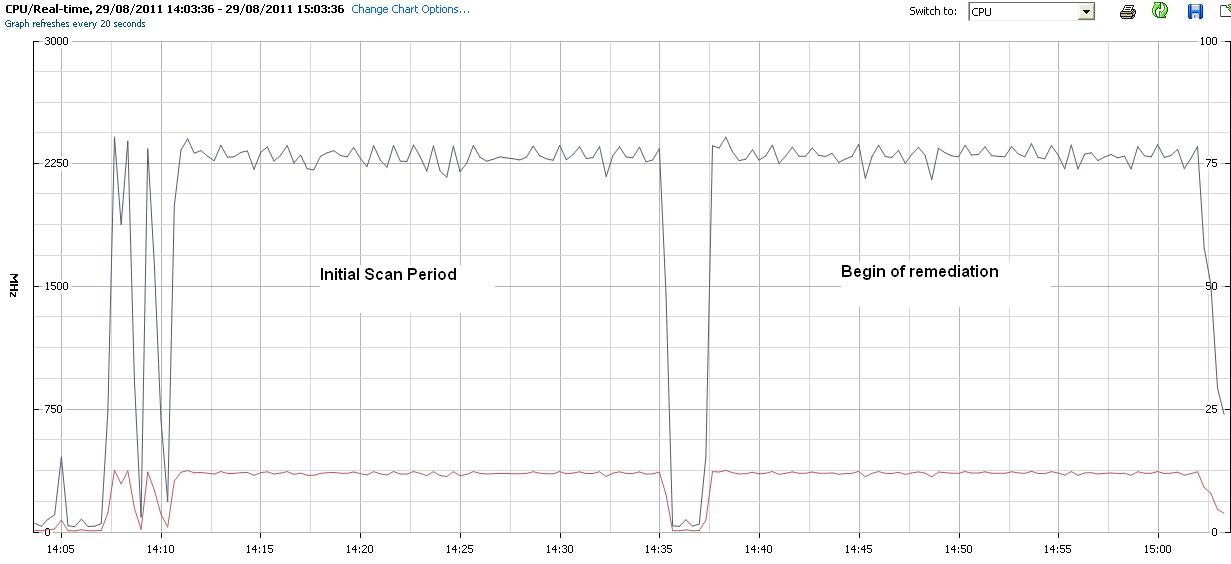
Update Manager "Scan for Patches" last for 25 minutes

As I wrote at the VMware community forum I encountered problem with the Update Manager which was scanning every host for 25 minutes and the entire remediation process for single host could last even for 1:30h like presented at the print-screen below:


Luckily with a little help of the VMware support I successfully managed to solve this issue.

The case was that the update manager itself was installed more than year and a half ago and it has gigantic repository - dozens of GB and hundreds of patches and bulletins...:)

I was recommend to update all host to 3.5 Update 5a (which breaks all previous patch inheritance) and reinstall the update manager.

It helped and now scanning last for 30 seconds.


poniedziałek, 9 stycznia 2012

VMware vCenter 4.1 crashes with Error[VdbODBCError] (-1)

It happened to me few days ago when I tried to reconnect ESX 4.1 host with some running VMs back to the vCenter.

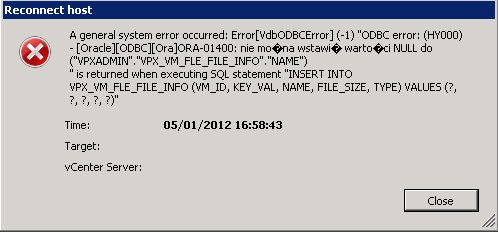
vCenter server service crashed with the following error:

A general system error occured: Error[VdbODBCError] (-1) "ODBC error: (HY000) - [Oracle][ODBC][Ora]ORA-01400: cannot insert NULL into ("VPXADMIN"."VPX_VM_FLE_FILE_INFO"."NAME")
" is returned when executing SQL statement "INSERT INTO VPX_VM_FLE_FILE_INFO (VM_ID, KEY_VAL, NAME, FILE_SIZE, TYPE) VALUES (?, ?, ?, ?, ?)"


VMware discribed this issue at KB1032726

To solve it they recommend to change database schema with ALTER TABLE VPX_VM_FLE_FILE_INFO MODIFY NAME NULL;


Do you have your DBA on call 24/7...?? If not its simpler to just use the vSphere client to connect directly to the ESX host and check your VMs for any inconsistency.


You will find disk described as /vmfs/devices/machine.vmdk instead of [Datastorename]/VMname/machine.vmdk


You can simply remove the disk from the VM or unregister the VM from the ESX inventory and then reconnect the host to the vCenter.

Worked for me...

środa, 7 grudnia 2011

Renew ESX(i) evaluation period

60 days trial period offered by the VMware for all its products is, in my opinion, to short to completely test and assess new platforms.

Below you will find simple procedure to reset the evaluation period without reinstalling the host.
It is even possible to do it with running VMs but of course it isn't the recommended way..:)


For ESX host:
  1. Login through SSH to the host's service console 
  2. su - and enter the root password
  3. go to /etc/vmware
  4. rm -r vmware.lic and answer the prompt with y
  5. rm -r licence.cfg  and answer the prompt with y 
  6. Restart the vpxa agent: service vmware-vpxa restart

Procedure for the ESXi host is almost identical and its greatly described here.

As I tested those procedures works for every 4.x or 5.0 hosts.

wtorek, 8 listopada 2011

Dynamic Binding in distributed vSwitch is depreciated in vSphere 5.0

As of vSphere 5.0 the dynamic binding option in dvSwitch port groups earned the "Depreciated Status"
Why..??
I am not really sure...:)

VMware recommends using Static Binding for performance gain:

But as described in the KB 1010593 and KB 1022312 the only difference is in the way the ports are assigned to VMs. With static binding the port are assigned "once and forever" until removal from inventory or changing port group. With dynamic binding port are assigned every time during powering up.

Personally I haven't noticed any performance issues with the dynamic ports. However it is strongly recommend to change it - so its time to plan some downtime...:)

Once caveat -> all VMs with particular Port Group must be powered off to change its binding type...:) 

środa, 2 listopada 2011

VMware Update Manager: The session is not authenticated

Today I ran into strange issue with the VMware Update Manager 4.

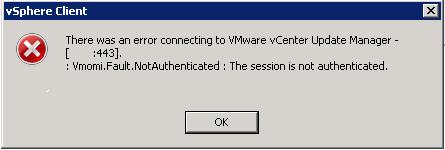
Whenever I tried to enable plug-in I received following error:
There was an error connecting to the VMware vCenter Update Manager [VUM server name:443].
: Vmomi.Fault.NotAuthenticated : The session is not authenticated.

Also the C:\Users\All Users\VMware\VMware Update Manager\Logs\vmware-vum-server-log4cpp.log logged only the "Not Authenticated" error.

------------------------------------------------------
Invoking login on integrity.SessionManager:Integrity.SessionMgr session "SessionID"
Arg userName: "DOMAIN\Username"
Arg sessionId: "Session ID"
Arg locale: "en_US"
------------------------------------------------------
[2011-11-02 08:42:01:123 'Activation.trace' 3388 DEBUG] [activationValidator, 1094] Throw vim.fault.NotAuthenticated
Result:
(vim.fault.NotAuthenticated) {
dynamicType = ,
faultCause = (vmodl.MethodFault) null,
object = 'vim.Folder:group-d1',
privilegeId = "Sessions.ValidateSession",
msg = "The session is not authenticated.",
}
[2011-11-02 08:42:08:699 'JobDispatcher' 1852 DEBUG] [JobDispatcher, 391] The number of tasks: 0


The only one change which occurred since my last logon was the time change from Summer to Winter...:) 


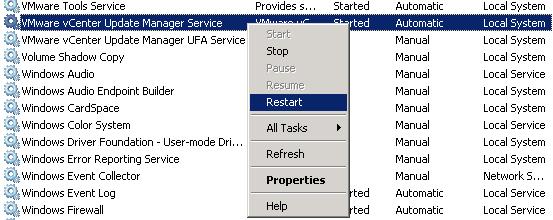
To solve this issue you just need to restart the VUM service:

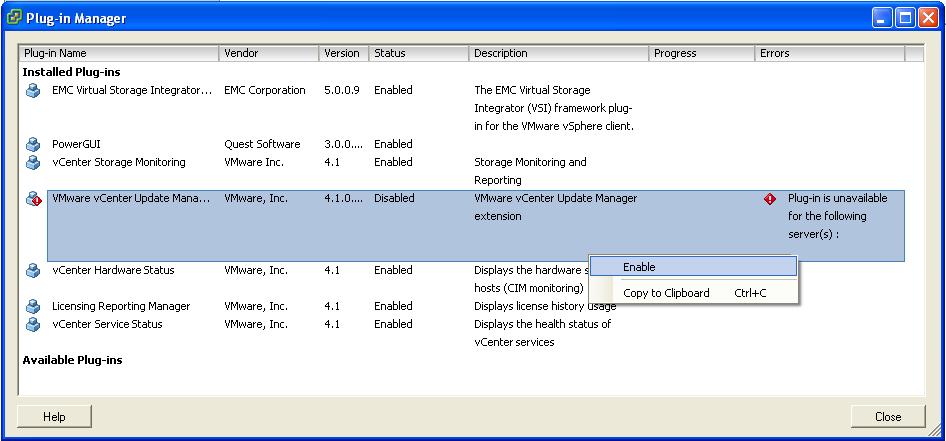
And re-enable the vCenter Plug-in:

niedziela, 30 października 2011

VMware vSphere 4.1 Update 2 Released -> ESX, ESXi, vCenter

VMware just release Update 2 for its 4.1 ESX(i) hypervisor and vCenter Server.

What's new section of this release covers following features:
  • Support for new AMD Processors ->Opteron 6200 (Interlagos) and 4200 (Valencia)
  • Support for additional guest OS -> Ubuntu 11.10
  • Support for MS SQL 2008/2008R2 Express as the vCenter database.
  • Dozens of bugfixes.. :)

You can check all the details at following announcements:
ESX
ESXi
vCenter

Happy upgrading... :)

czwartek, 20 października 2011

VMware Update Manager had a failure when scanning ESX 3.5 hosts

Update ESX 3.5 host, which does not have ESX350-201012410-BG patch applied, through VMware Update manager after 1 June 2011 will end in:

This patch only updates security key at the ESX host and does not require restart nor machine migration to apply and has only one dependency which also can be applied without downtime.


Below you will find simple procedure, which always perfectly works for me:

1. Download patches from VMware   :
2. Unzip them to local drive to ESX-201012404-BG and ESX-201012410-BG folders
3. Login trough SSH and create folder: mkdir /patches
4. Login trough WinSCP and upload unzipped folders to the /patches
5. At the ESX console execute following commands:
  • cd /pachtes/ESX350-201012404-BG
  • esxupdate -b=/patches/ESX350-201012404-BG/ --nosig update
  • cd /pachtes/ESX350-201012410-BG
  • esxupdate -b=/patches/ESX350-201012410-BG/ --nosig update
6. Scan with update manager and update with recent baselines

wtorek, 18 października 2011

HP ProLiant servers and VMware compatibility

How often do you wonder if your HP server is compatible and supported by both HP and VMware with your current ESX(i) version...?? Or maybe it is only supported by HP and it is not certified by VMware...??

Did you ever checked if your physical host is compatible with particular Fault Tolerance and vLockstep version...??

You can easily check detailed compatibility list at HP Support Matrix -> All in One. Really good job done by HP. Congratulations.

sobota, 15 października 2011

HP Onboard Administrator 3.32 Released

HP just released new firmware for the c-class enclosure's Onboard Administrator v. 3.32, which can be directly downloaded for the HP website.

There is only one change since OA 3.31. It fixes security vulnerability described as CVE-2011-3155 in the HP security bulletin no. c03048779.

środa, 5 października 2011

Admission Control and HA initiated restarts


Today I attended the vSphere 5.0: Overview training. This is the course where you can learn all the basic stuff that is necessary to operate vSphere Cluster. One of the discussed things was the Admission Control and its influence on powering up machines in our virtual infrastructure.

Now I can see how much misunderstanding arose around this mechanism and its connection with High Availability and possible hosts failures. Responsibility for Admission Control lies in the vCenter server and it is role is to not power up new machines when the configured constraints are violated. In case of the host failure the restarts are initiated by the host, not the vCenter server so all restarts, even if resources are low, will occur.

Let’s make a short quote from one of the best books about VMware HA written by Frank Denneman and Duncan Epping where they describe this mechanism in details:

“Admission Control will not disallow HA initiated restarts. HA initiated restarts are done on a host level and not through vCenter.”

środa, 14 września 2011